AI & Search Crawler Access Checker
Test if AI crawlers can reach your site
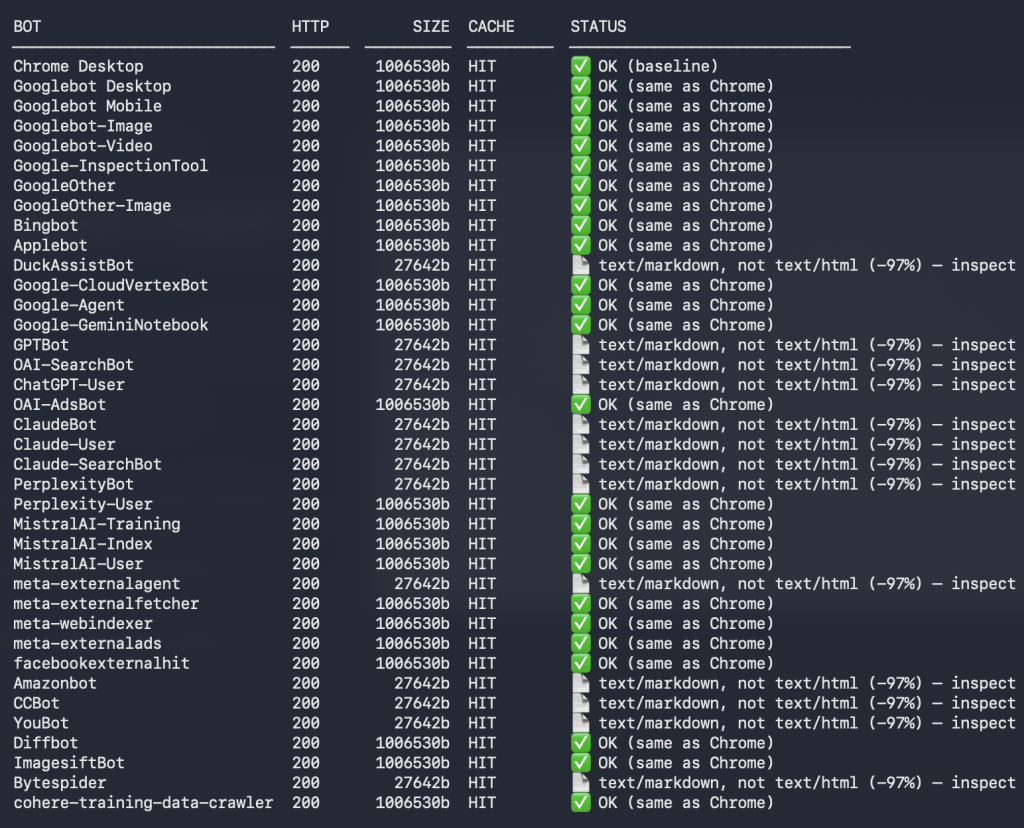
This free script checks your robots.txt and then requests your page as over 30 AI and search bots, so you see what your server actually returns to each of them.
- Checks your robots.txt rules for over 30 AI and search crawlers
- Requests your page as each bot and compares it with Chrome, so blocks, challenge pages and cloaking show up.
- Free and open source. One command, no signup, no API key.
Why robots.txt is not enough
robots.txt is a request. It tells crawlers what you would like them to do. It says nothing about what your CDN actually does when they arrive.
Plenty of sites have a perfectly open robots.txt, while Cloudflare, Akamai or a WAF rule quietly returns 403 to Googlebot or serves GPTBot a challenge page.
You can’t see it from your browser, and it rarely shows up in a standard crawl.
- Hard blocks — 403 or dropped connections for specific user agents.
- Soft blocks — a 200 OK that is really a Cloudflare challenge, a captcha or a near-empty page. Worse than a 403, because it looks like success in your logs.
- Cloaking and noindex — bots served very different content, or an X-Robots-Tag: noindex header nobody remembers adding.
How to check if your site blocks AI crawlers
Run it from two places
Firewalls block by bot name and by IP address. Run the script once from your own computer and once from Google Cloud Shell, and you’ll see which of the two causes a block. Each run takes about a minute.
Your computer (Terminal)
Residential IP: what a normal visitor looks like.
Works on macOS and Linux. Open Terminal and paste:
					curl -sO https://raw.githubusercontent.com/Ljubica-Streamlit/bot-block-checker/main/bot-block-checker.sh && chmod +x bot-block-checker.sh
./bot-block-checker.sh https://www.example.com/
On Windows? PowerShell and Command Prompt can’t run bash. Use Git Bash (included with Git for Windows) or WSL — or go straight to Cloud Shell.
Google Cloud Shell
Datacenter IP: what real crawlers look like. Free, nothing to install, runs in your browser. Open shell.cloud.google.com, sign in with any Google account, and paste the same two commands:
					curl -sO https://raw.githubusercontent.com/Ljubica-Streamlit/bot-block-checker/main/bot-block-checker.sh && chmod +x bot-block-checker.sh
./bot-block-checker.sh https://www.example.com/
Save each run to its own file so you can compare them: add | tee botcheck-local.txt to the second command on your computer, and | tee botcheck-cloud.txt in Cloud Shell.
Note: If one run shows nothing useful (even the Chrome baseline row fails), the problem is that connection, not the site’s bot rules. The other run still gives you an answer.
How it works
Five checks in one run
One command runs five checks in order, from what your robots.txt says to what your server actually returns to each bot.
- robots.txt: reads your declared rules for each of the tested bots.
- Redirects: resolves the final URL – you test the page you meant to.
- Bot tests: one request per bot, one second apart, each compared with Chrome by status code, page size and body content.
- 429 retests: any bot that got rate-limited is retested alone with a cool-down, to separate a real block from too many requests.
- Infrastructure: detects your CDN and host from response headers (Cloudflare, Akamai, WP Engine, Kinsta and more), so you know where a block comes from.
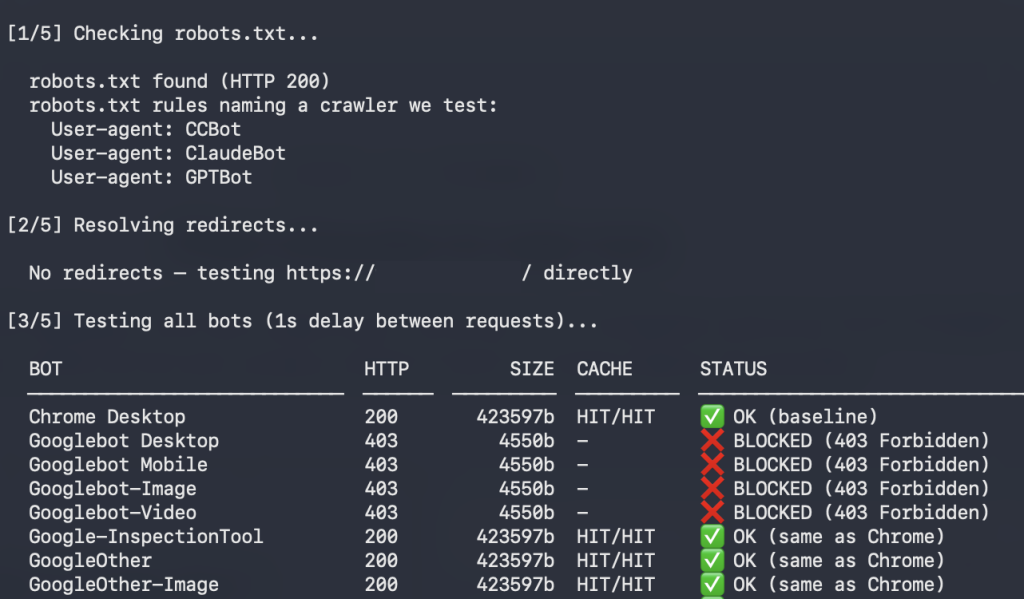
Compare step 1 with step 3. A bot allowed in robots.txt but blocked in step 3 means someone added a CDN rule nobody documented.
403s, challenge pages and cloaking explained
What each result means
Result
What to do
OK / same as Chrome
Nothing. The bot gets the same page you do.
DIFFERENT (10–50%)
Check manually. Could be rotating content, could be partial cloaking.
VERY DIFFERENT (50%+)
Strong cloaking signal.
BLOCKED (403 or confirmed 429)
A deliberate CDN or WAF rule.
CF CHALLENGE / CAPTCHA / ACCESS DENIED
Effectively blocked — crawlers can’t solve them.
X-ROBOTS-TAG: NOINDEX
Served fine, but won’t be indexed. Often accidental.
TINY BODY
Under 500 bytes. A stub, error page or soft block.
The CACHE column shows whether each response came from your CDN’s cache (HIT) or from your server (MISS). Only responses from your server tested its blocking rules.
Seeing HIT in the CACHE column?
Those responses came from your CDN’s cache, which doesn’t check its blocking rules, so they don’t tell you much. Run again with --cache-bust:
./bot-block-checker.sh --cache-bust https://www.example.com/
It adds a unique query string to every request, so each one reaches your server. The run is slower, with 10 seconds between requests and about 6–7 minutes in total, because uncached requests are more likely to trip rate limits. Some CDNs ignore query strings when caching, and the script warns you when that happens.
Quick answers to questions you may have
Is this AI crawler checker free?
Yes. It’s a free, open-source script under the MIT license. No signup, no API key.
How do I check if my site blocks AI crawlers like GPTBot and ClaudeBot?
Run the script with your URL. It reads your robots.txt, then requests the page as GPTBot, ClaudeBot, PerplexityBot and over 30 other bots, and shows which ones get blocked, challenged or served different content.
Why does every bot show OK when I know my site blocks some of them?
Your CDN probably served a cached copy. Cached responses skip the blocking rules, so a block set at your server never shows up. Check the CACHE column: if most rows say HIT, run the script again with –cache-bust. Some CDNs ignore query strings when caching, and the script warns you when that happens.
Why would Cloudflare block Googlebot or GPTBot if robots.txt allows them?
robots.txt and your CDN work independently. Bot protection, AI-bot blocking settings or custom WAF rules can reject a crawler before it ever reads robots.txt. That’s the kind of block this script is built to find.
How is this different from a robots.txt checker?
A robots.txt checker shows what you ask bots to do. This script also shows what your server actually does: it requests the page as each bot, compares the response with Chrome, retests rate limits, and covers search engines as well as AI crawlers.
Should I block GPTBot or ChatGPT-User?
They do different jobs. Training crawlers like GPTBot and ClaudeBot collect data for model training. Retrieval agents like ChatGPT-User and Perplexity-User fetch pages live to answer questions. Blocking the second group keeps you out of AI answers, which is usually not what site owners intend.
My site blocks bots from Cloud Shell but not from my computer. What does that mean?
The block is based on IP, not bot name: datacenter IP ranges are being rejected. Real crawlers like Googlebot and GPTBot crawl from datacenter IPs, so they likely hit the same block. This is the result to fix first.
Does a blocked Googlebot result mean Google can't crawl my site?
Not necessarily. The script sends a claimed user agent, and sites with proper bot verification block fake Googlebots while serving the real one. Confirm with URL Inspection in Google Search Console or your server logs.
Which pages should I test?
More than the homepage. Blocking rules are often path-specific, so test a blog post, a product or category page, and any page you want AI tools to cite. You can test sites you don’t own too; just avoid repeated runs, or you may get rate-limited.
How do I run it on Windows?
Use one of these three options. PowerShell and Command Prompt can’t run bash scripts: their curl is a different command, and Windows has no bash or chmod.
- Google Cloud Shell (easiest). Nothing to install. Open shell.cloud.google.com, sign in with a Google account, and paste the two commands unchanged. You also get the datacenter-IP run for free.
- Git Bash. If you have Git for Windows, open Git Bash from the Start menu and paste the commands as written. Don’t have it? Download it from git-scm.com.
- WSL. Run wsl –install in PowerShell as Administrator, restart, open Ubuntu, and run the commands there.