Free Content cannibalization tool
Find duplicate and near-duplicate content across your site
Upload a crawl export and this free semantic similarity analysis compares every page with every other page. Similar pages come back grouped by topic, in one Excel file, ready for your decisions.
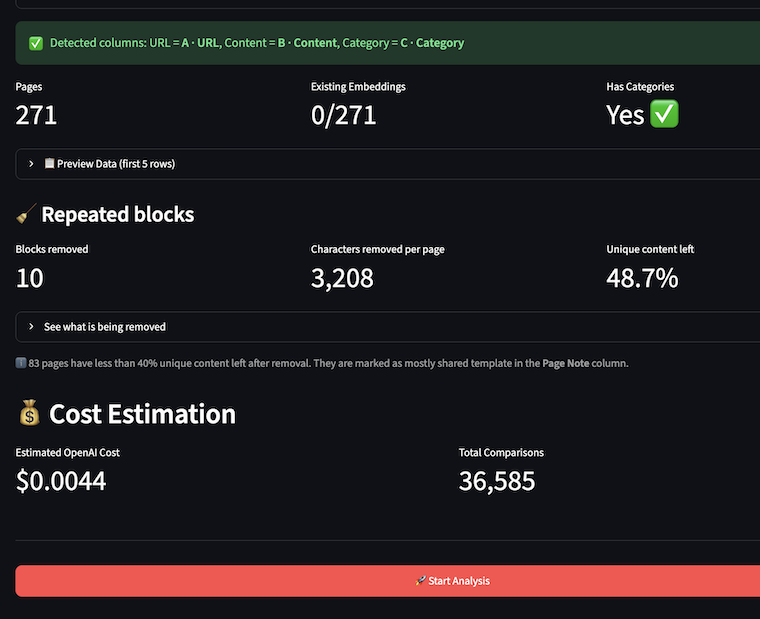
- Compares meaning with AI embeddings, after removing nav, footers and other blocks that repeat on most pages.
- Groups similar pages by topic, with a Decision column: keep, merge, redirect, noindex or rewrite.
- Free and open source. You only pay OpenAI, about $0.02 per 1,000 pages.
Spot content cannibalization
Similar content rarely looks the same
Exact duplicates are easy to spot. Content cannibalization usually isn’t: two articles on the same topic written years apart, service pages that say the same thing in different words, or location pages that differ only by a city name.
Word-matching tools often miss it, because the wording is different. And on a full crawl export, every page shares the same menu and footer, so everything looks similar to everything.
Same topic, different words
Pages that cover the same subject and angle, written separately.
Near-duplicates
Copies with small edits, old versions, or pages published twice.
Template pages
Location, event or product pages built from one template, with very little of their own content.
How semantic similarity analysis works
From crawl export to decisions in four steps
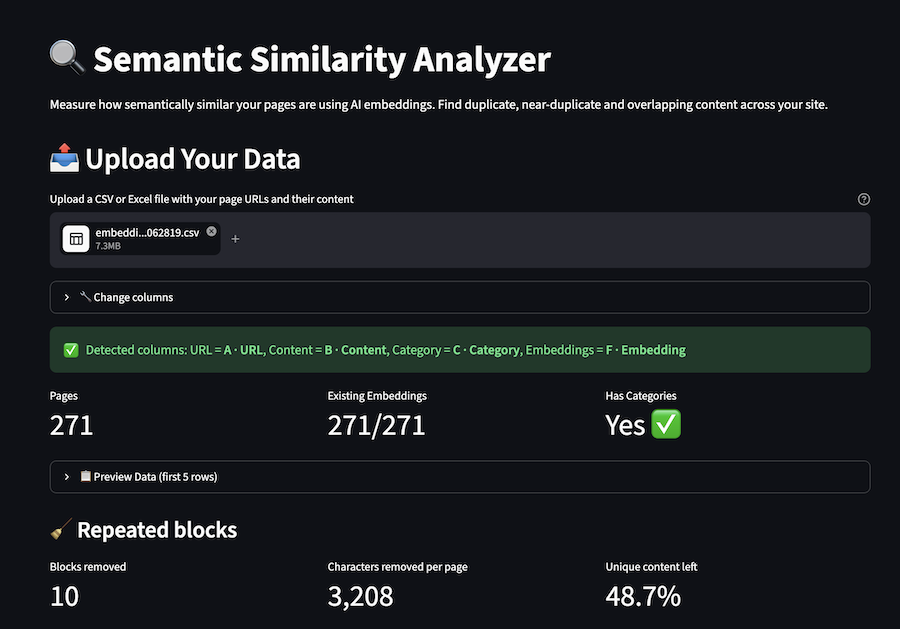
1. Upload your crawl export
CSV or Excel with URLs and page content, such as a Screaming Frog export with Address and Body Text. Columns are detected automatically, with or without headers. No crawler? Extract your content with the free Content Extractor for Google Sheets™.
2. Check the cost, then add your OpenAI key
The estimated cost is shown before you enter a key. Your key is used only during the session and never stored.
3. Let the tool clean and compare
Text that repeats on most pages (nav, footer, cookie banners, CTAs) is removed first, and you can see what was removed. Then every page is compared with every other page.
4. Download one Excel file
Topic groups, template groups, every similar pair, a summary, and your embeddings to reuse later. Prefer CSV? Each sheet can also be downloaded as a separate file.
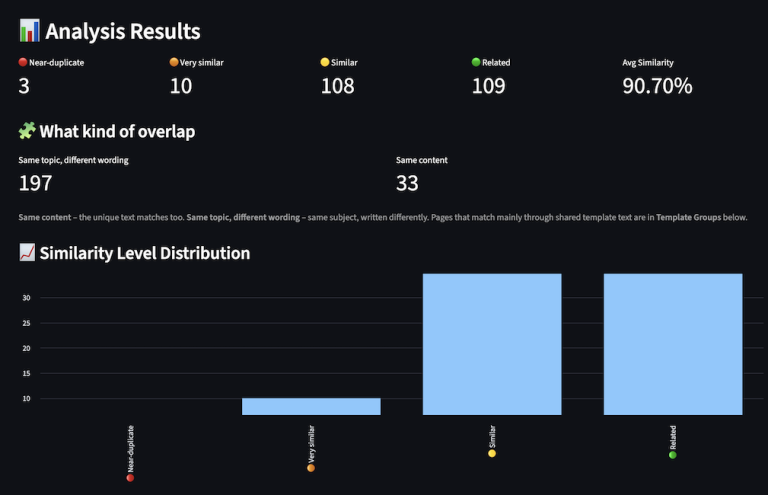
Not sure which threshold to use? The results show how many pairs you'd get at 80, 85, 88, 90, 95 and 98% similarity. Run again with another threshold in the same session: the embeddings are reused, so it costs nothing.
Duplicate and near-duplicate content, grouped
Results you can act on, not just a list of pairs
- Topic groups. Similar pages are grouped by topic, and every page in a group is similar to every other page in it, so unrelated pages never chain together. Likely duplicates come first. Each page has a Decision dropdown (Keep, Merge, Redirect, Noindex, Rewrite, Leave as is) and a Notes column, so you can keep one page and redirect another.
- Template groups. Thin pages that mainly share a template, like location or event pages, are grouped separately and named by the text they share. They’re a different problem from duplicate articles, so they get their own sheet.
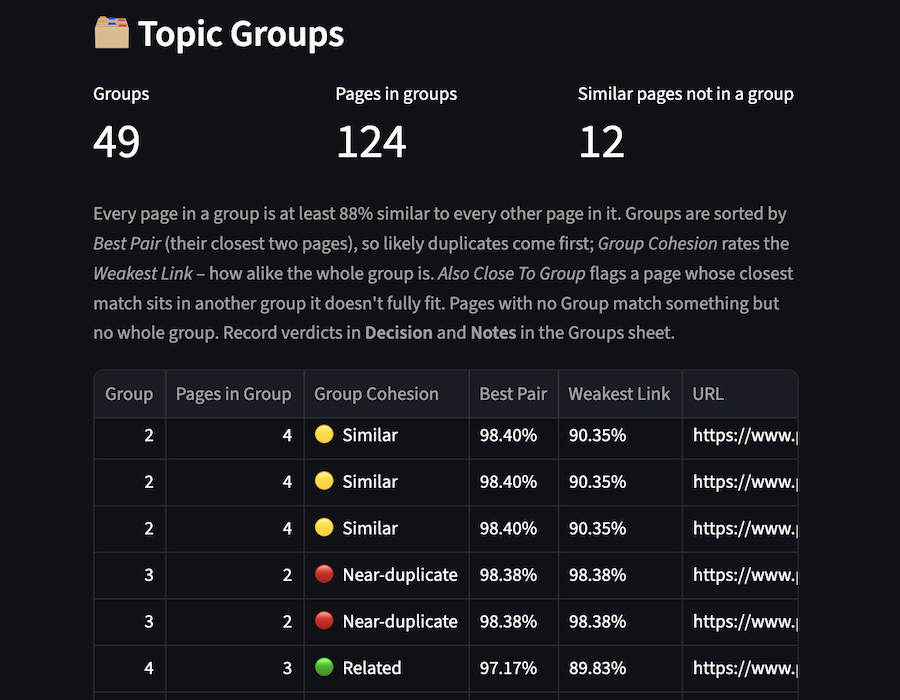
- Two scores for every pair. Semantic similarity compares the unique content by meaning. Full-page overlap compares the original wording. Together they tell you whether a pair is the same content or the same topic in different wording.
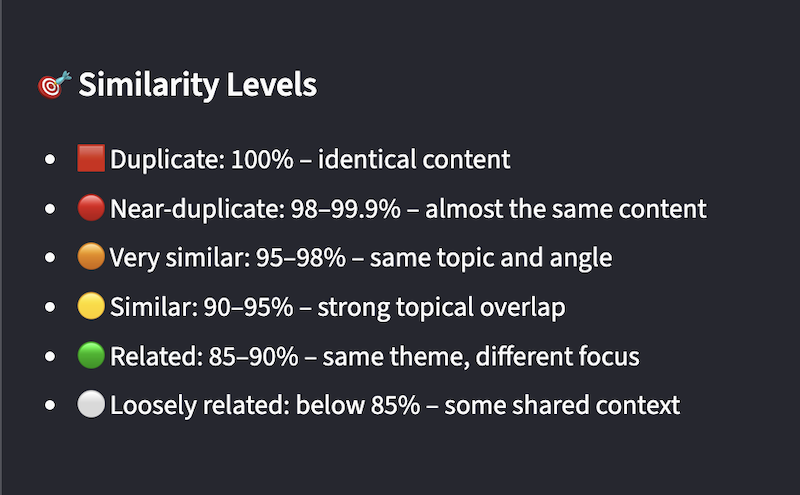
- Up to six similarity levels. Every pair is labelled from Duplicate to Loosely related, so you can start with the closest matches.
The tool doesn't choose which page to keep. That depends on traffic, links and business goals, so the decision stays with you.
Free semantic similarity tool
Costs cents. Stores nothing.
The only cost is OpenAI embeddings, usually a few cents, and you pay for each page only once.
What you pay on the first run
- Cost: The tool is free. You pay OpenAI directly for embeddings (text-embedding-3-small): $0.02 per million tokens, roughly 1,000 average pages. The estimated cost is shown before you run, and everything else is free.
- Limits: Up to 5,000 URLs per run. Pages are compared up to the model's limit of about 8,000 tokens; longer pages are trimmed, and the tool lists which ones.
- Privacy. Your file and API key are processed in memory and never saved. Page content is sent to OpenAI to create the embeddings, under your own key.
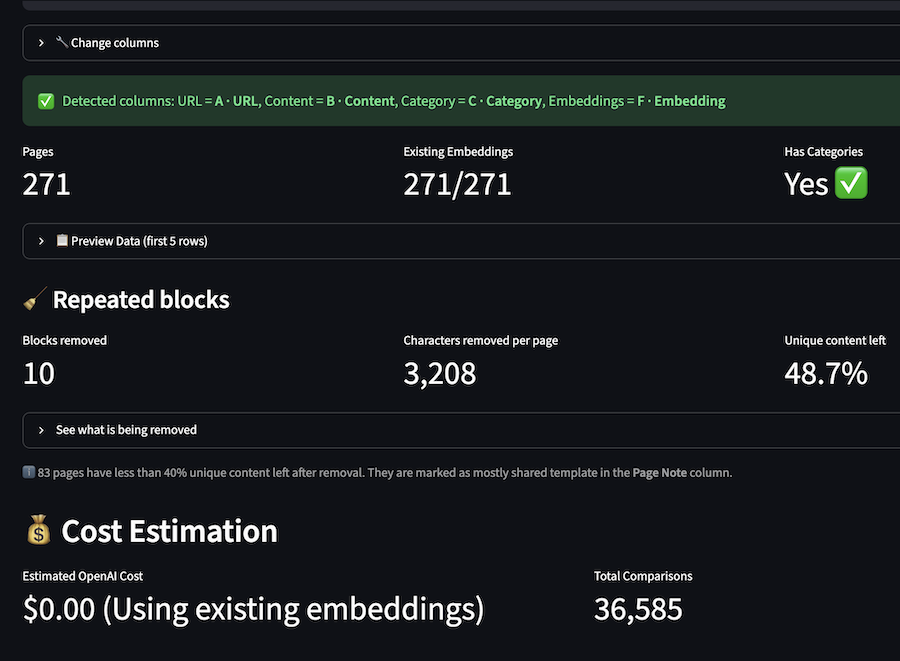
Free if you already have embeddings
Every download includes your embeddings. Upload the same file again and the tool reuses them, so the cost drops to $0.00 and you don’t need an API key.
- Try other thresholds for free. Only the comparison runs again.
- Add pages and pay only for those. Pages that already have an embedding aren’t sent to OpenAI again.
- Nothing is lost if a run stops. The file keeps every embedding created up to that point.
Questions about semantic similarity analysis
What is content cannibalization?
It’s when several pages on one site cover the same content: duplicates, near-duplicates, or the same topic written more than once. It splits your content across URLs instead of building one strong page.
Is content cannibalization the same as keyword cannibalization?
No. Content cannibalization is about the pages themselves: several pages with the same or very similar content. Keyword cannibalization is about search: several pages ranking for the same query. They often overlap, but this tool only compares content. It doesn’t use ranking or search data, so it can find similar pages even before they’re published or indexed. Read more about the difference between keyword and content cannibalization.
How do I find duplicate content on my own website?
What is semantic similarity analysis?
It compares pages by meaning rather than exact words. Each page is turned into an AI embedding, and the tool measures how close those embeddings are. Two pages can score high even when they share few words.
Can I compare pages by section or page type?
Yes. Add a Category column to your file, like blog, service or product. The results then show each page’s category and whether two similar pages are in the same one, so you can spot a blog post that overlaps a service page.
What's the difference between duplicate and near-duplicate content?
Duplicate content is identical or almost identical (about 100% similar). Near-duplicate content is 98–99.9% similar: copies with small edits, old versions, or pages that differ only in a few details.
Why remove repeated blocks before comparing?
Menus, footers and cookie banners appear on every page, so they make all pages look alike. Removing them means scores reflect each page’s own content. You can see what’s removed, change how common a block must be, or turn it off.
Which similarity threshold should I use?
Start with the default, 88%. The results show how many pairs you’d get at 80, 85, 88, 90, 95 and 98%, and re-running at another threshold in the same session is free. Later, upload the Excel file again to reuse your embeddings. Whatever the threshold, the score tells you what to read first, not what to fix.
What should I do with similar pages?
Review each group and record your decision: keep, merge, redirect, noindex, rewrite or leave as is. The tool doesn’t choose for you, because that depends on traffic, links and business goals. My content cannibalization audit guide walks through how to decide, step by step.
Does it work for non-English sites?
Yes, the AI embeddings work across many languages. Full-page overlap filters out English filler words, so that score is less precise in other languages, especially those written without spaces between words, such as Chinese, Japanese or Thai.
My site has several languages. Should I upload them together?
Analyze one language at a time. Translations of the same page can score as similar, because the comparison is by meaning.