Backlink Monitor for Google Sheets™
Know when a backlink goes missing
Backlinks disappear without warning. A page gets redesigned, an editor removes your link, or someone adds nofollow. Backlink Monitor checks the pages in your spreadsheet and writes the result next to each one.
- Works inside Google Sheets™, with no new tool to learn
- Says when it couldn't check a page, instead of guessing
- Scheduled checks that email you only when something changed
What each backlink check includes
More than "is the link still there"
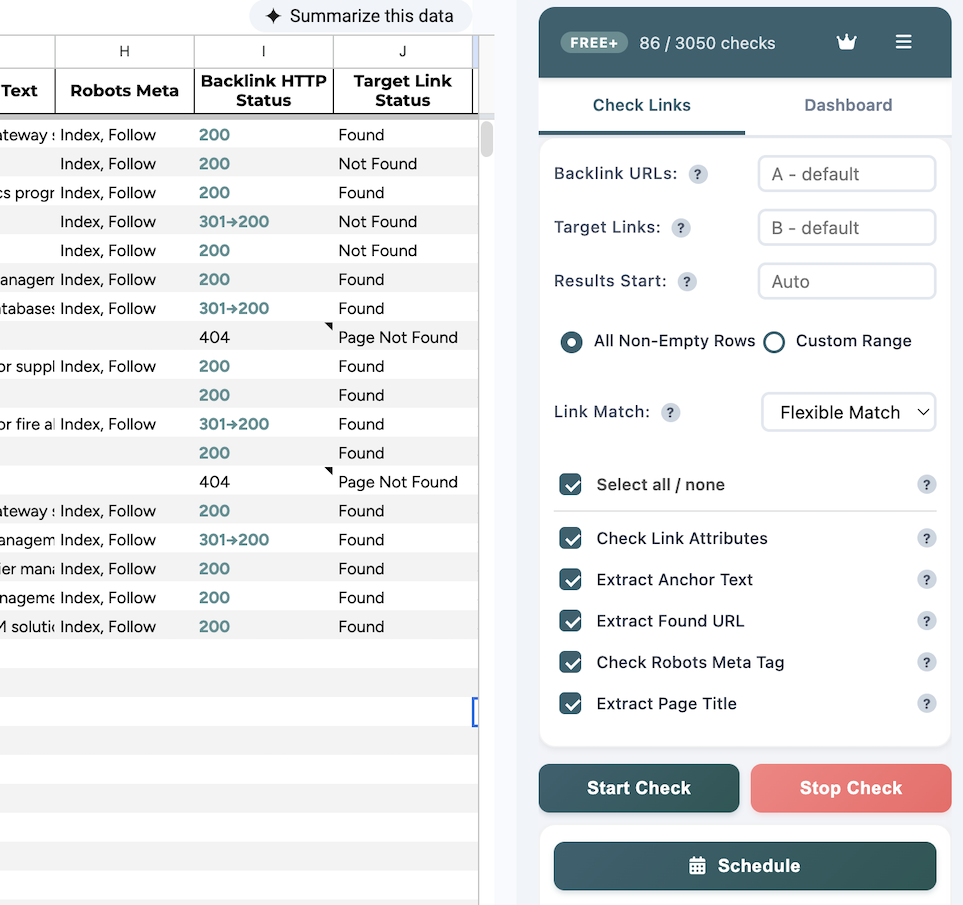
A link can still be on the page and stop counting. Every check reads the page once and collects everything that decides whether a link is still worth something.
1. Link status
Whether your link is on the page, using Flexible, Exact or Domain matching.
2. HTTP status
The status of the page, including redirects, such as 301 → 200.
3. Link attributes
Whether the link carries nofollow, ugc or sponsored.
4. Anchor text
he words your link uses, so you can see if they were changed.
5. Robots meta tag
he words your link uses, so you can see if they were changed.
6. Page title
Also shows what was served when a page couldn't be read, like "Just a moment...".
Backlink Monitor checks links you already know about. It does not find new backlinks or analyze competitors.
How to check backlinks in Google Sheets™
From your link list to results in four steps
Set up once, and let the add-on handle the heavy lifting.
- Install the add-on. Install Backlink Monitor from the Google Workspace™ Marketplace and allow the permissions it asks for.
- Add your links. Put the pages that should link to you in column A and the URLs they should link to in column B. Or start from the ready-made template.
- Choose what to check. Open Extensions → Backlink Monitor → Open Backlink Monitor. Pick the rows, the match type and the details you want.
- Run the check. Results appear next to your data as each row finishes. You can stop the check at any time.
Match types: Flexible ignores http or https, www and trailing slashes, and is the default. Exact needs the URL to match character for character. Domain accepts any link to your domain.
Backlink status explained
It tells you when it doesn't know
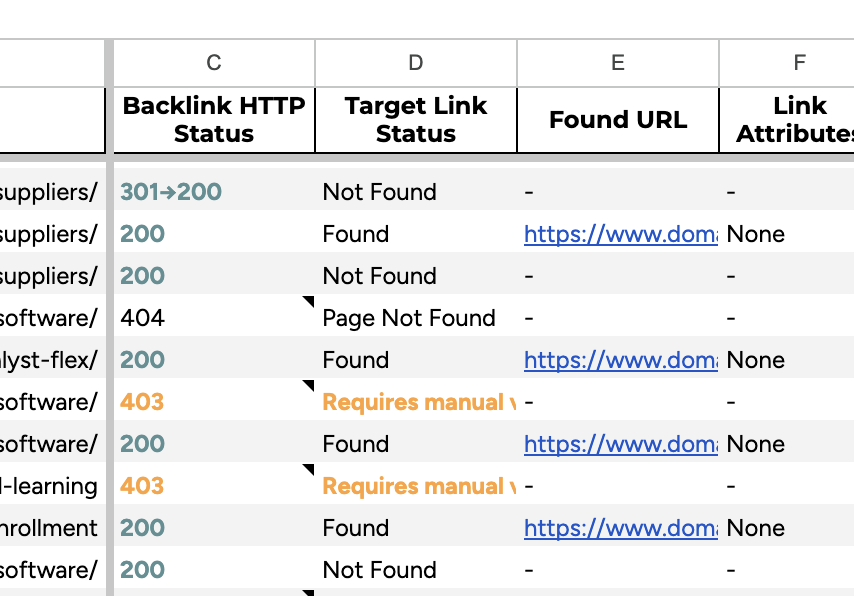
Many backlink checkers report “not found” whether they read the page or not. Backlink Monitor keeps those apart, so a blocked page never looks like a lost link.
Status
What it means
Found
Your link is on the page.
Not Found
The page was read and your link isn’t on it.
Page Not Found
The page returns a 404, so the link is gone with it.
Requires manual verification
The site refused the request. Open the page in your browser to check.
Bot Challenge
A bot protection page was shown so there’s no result.
Not Supported
Social platforms that can’t be checked from a server, like X, Facebook, Instagram, LinkedIn and TikTok.
When a page can't be read, the Page Title column shows what was served instead, like "Just a moment...". Manual results get black column headers and scheduled results get red ones, so you can tell them apart.
Scheduled backlink monitoring
Get an email when a backlink changes
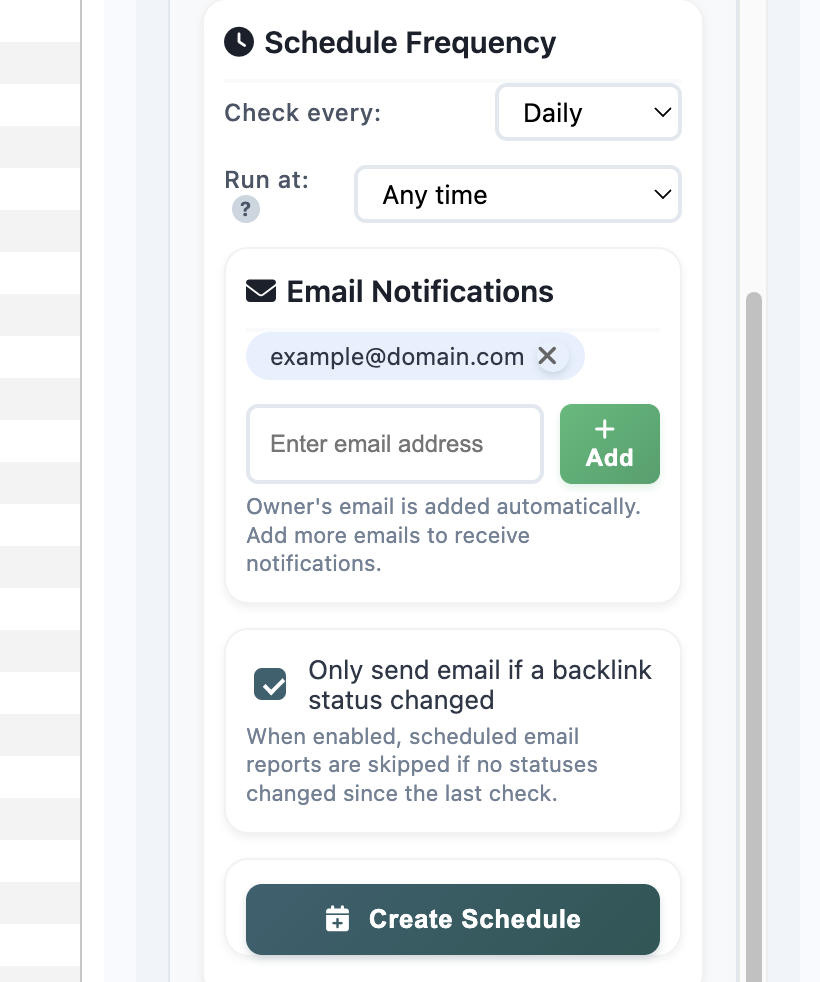
Set a schedule once and Backlink Monitor checks the whole sheet daily, weekly, every two weeks or monthly. Scheduled checks run even when the spreadsheet is closed.
- See what changed. Each scheduled check is compared with the previous one and marked No Change, Changed or New.
- Email only when something moves. Changes-only mode is on by default, so you won't get a weekly email that says nothing. You can add more people to the report.
- No false alarms. If a page couldn't be read on one of the two checks, the row is marked Not Comparable instead of reported as lost.
- A dashboard in your sheet. The Dashboard tab shows the last and next check, totals, and lets you edit emails or remove the schedule.
Backlink Monitor plans and pricing
Checks are spent on answers, not attempts
One check is one page visited, so a scheduled check of 40 rows uses 40 checks. Manual and scheduled checks share the same monthly checks. If a page can’t be read because it’s blocked, times out or returns a server error, the check is refunded automatically.
Free
Ready as soon as you install-
1 scheduled spreadsheet
-
All features included
Free Extended
Claim it once, from inside the add-on-
3 scheduled spreadsheets
-
All features included
Pro
Coming soon-
Click Upgrade in the add-on to show interest
Limits and data privacy
No surprises after you install
What it can't do
- Some pages can't be read. About one in ten sites block automated requests. Those rows are marked clearly and the check is refunded.
- Links added with JavaScript are usually missed. It reads the HTML the server sends, not the page after scripts run.
- Pages behind a login and social platforms can't be checked.
What happens to your backlink data
- Your link list and results stay in your Google Sheets™ spreadsheet. The add-on can only access the spreadsheet it's open in, and the pages it checks are never stored.
Questions about Backlink Monitor
Is Backlink Monitor free?
Yes. The Free plan includes 50 checks a month and 1 scheduled spreadsheet. Claim Free Extended once from inside the add-on to get 150 checks a month and 3 scheduled spreadsheets. Checks that fail to read a page don’t count. A page that returns a 404 does count, since a removed page is a real result. We’re working on a Pro plan.
Does it find new backlinks?
No. It checks backlinks you already know about, like guest posts, PR placements or paid links.
How many links can I check at once?
There’s no row limit, and a scheduled check can handle several hundred rows. Your monthly checks are the real limit: 50 on Free and 150 on Free Extended. Each row you check uses one check.
Why does a row say Requires manual verification?
The site blocked the automated request, often because of bot protection like Cloudflare. Open the page in your browser to check the link yourself. The check isn’t counted against your quota.
Can I check links on social media?
No. X, Facebook, Instagram, LinkedIn and TikTok need a login or load their content with JavaScript, so they’re marked Not Supported.
Does it work with a personal Google account?
Yes. It works with personal Google accounts and Google Workspace™ accounts. If you use a work account, your Google Workspace™ admin may need to allow the add-on.
When do scheduled checks run?
Within about an hour of the time you pick. Google runs scheduled add-ons this way, so checks don’t start to the minute.
Can I change a schedule's settings?
Settings are saved when you create the schedule, including the email addresses. To change anything, remove the schedule and create a new one.