
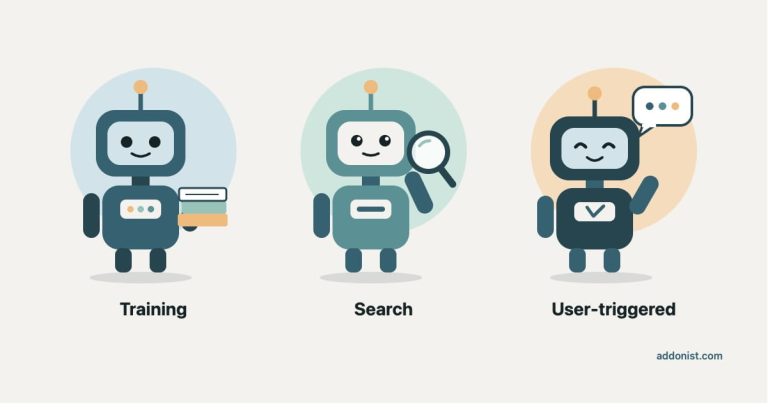
AI visibility is still a new field for most of us in SEO, and there’s a lot of confusion about the bots behind it. Many people talk about “AI bots” as if they were one thing, but they do very different jobs. Some collect content to train models, some build the index AI answers come from, and some read a page only when a user asks.
That’s why not every blocked AI bot is a problem. Some companies block certain bots on purpose, for example to keep their content out of model training or to reduce the load on their server. As SEOs, our job is to know which blocks are intentional and which ones can cost visibility the site actually wants.
It also helps to remember that a bot is not the model. GPTBot doesn’t answer questions in ChatGPT. It collects pages. What the model can do with your content depends on which bot was allowed to fetch it.
| Type | Examples | If you block it |
|---|---|---|
| AI training crawlers | GPTBot, ClaudeBot, CCBot | Your content is left out of future training. You can still be cited in AI answers. |
| AI search crawlers | OAI-SearchBot, Claude-SearchBot, PerplexityBot | Your pages may not be shown or cited in that tool’s AI search answers. The exact effect depends on the provider. |
| User-triggered AI fetchers | ChatGPT-User, Claude-User, Perplexity-User | The AI can’t read your page, even when someone shares the link. |
3 types of AI bots
AI companies use different bots for different jobs, and the biggest ones now let you control each job separately. That’s what makes it possible to block one type without losing the others.
The biggest difference between them is when your content is used:
- Training happens before a model is released. What the model learns stays fixed until the next version.
- Retrieval happens when someone asks a question. The AI looks up relevant pages and uses them to write its answer. This is often called retrieval-augmented generation, or RAG.
Search crawlers and user-triggered fetchers are both part of retrieval. Search crawlers collect pages in advance and store them in an index, while user-triggered fetchers read a page live at the moment someone asks. Retrieval is also what lets AI tools cite your page with a link, which is why these two types matter most for your AI visibility.
Training
Training crawlerGPTBot, ClaudeBot
Before releasePages go into model training
Model knowledgeNo link back to your page
Retrieval (RAG)
Search crawlerOAI-SearchBot, PerplexityBot
In advancePages are stored in an index
AI answerCan cite your page with a link
User-triggered fetcherChatGPT-User, Claude-User
When a user asksThe page is read live
AI answerBased on your current page
1. AI training crawlers
AI training crawlers collect public web content that may be used to train future AI models. What they collect becomes part of what a model “knows” in general, without a link back to your page.
Examples:
- GPTBot from OpenAI
- ClaudeBot from Anthropic
- CCBot from Common Crawl, a nonprofit whose open web archive is used by many AI companies for training
Not every AI company runs a training crawler. Perplexity, for example, says its bots are not used to collect training data for AI models.
What happens if you block AI training crawlers?
Your future content is left out of training for that company’s models. Content that was collected before you added the block isn’t removed from models that already exist.
Blocking a training crawler doesn’t remove you from AI answers. OpenAI and Anthropic both treat their training and search bots as separate settings, so you can block GPTBot or ClaudeBot and still be found and cited through their search bots.
The trade-off is long term. If models are never trained on your content, they may know less about your brand when they answer without searching the web.
Who should block AI training crawlers?
Publishers are the clearest example. A BuzzStream study of the top 100 news sites in the US and UK found that 79% block at least one AI training bot. Many of them don’t want their articles used to train AI models, so for them this is a deliberate choice, not a mistake.
But the same study found that 71% also block at least one AI search or live-fetch bot, which can cost them citations in AI answers too. If you want to keep your content out of training but still be cited, block only the training crawlers and leave the search bots open.
For most business sites, blocking training crawlers costs little visibility. Whether to do it depends on your content strategy, and on whether you want your content used to train AI models.
2. AI search crawlers

AI search crawlers build the index that AI tools search when they answer a question. When ChatGPT, Claude or Perplexity cite a source with a link, the page usually comes from this index. This works much like a classic search engine, but for AI answers.
Examples:
- OAI-SearchBot from OpenAI, for ChatGPT search
- Claude-SearchBot from Anthropic
- PerplexityBot from Perplexity
What happens if you block AI search crawlers?
Your pages may not be shown or cited in that tool’s search answers, and the exact effect depends on the provider. OpenAI says sites that block OAI-SearchBot won’t appear in ChatGPT search answers, though they can still show up as plain navigation links. Anthropic says blocking Claude-SearchBot may reduce your visibility in Claude’s search results.
This is the biggest visibility loss of the three types. If search crawlers can’t get in, you’re not in the pool of sources the AI chooses from.
Robots.txt changes aren’t instant. OpenAI and Perplexity both say updates can take about 24 hours to take effect.
Who should block AI search crawlers?
Very few sites should. If you want traffic or mentions from AI tools, allow search crawlers. Blocking them only makes sense if you want to stay out of AI search completely.
3. User-triggered AI fetchers
User-triggered AI fetchers don’t crawl the web on their own. They visit a page only when a user asks the AI to, for example by pasting a link into ChatGPT or asking a question that needs live information. They fetch the page, read it, and use it for that one answer.
Examples:
- ChatGPT-User from OpenAI
- Claude-User from Anthropic
- Perplexity-User from Perplexity
What happens if you block user-triggered AI fetchers?
The AI can’t read your page, even when someone shares your link or asks about it directly. The user gets an answer without your content, or an answer that says the page couldn’t be opened.
These bots also play by different rules. Because a user started the request, OpenAI says robots.txt rules may not apply to ChatGPT-User, and Perplexity says Perplexity-User generally ignores them. Anthropic says its bots, including Claude-User, follow robots.txt. So a robots.txt rule alone won’t reliably stop every user-triggered fetcher, while a firewall or CDN block will. That makes an accidental block at the server level more costly than a robots.txt rule.
Blocking ChatGPT-User also doesn’t decide whether you appear in ChatGPT search. OpenAI uses OAI-SearchBot for that.
Who should block user-triggered AI fetchers?
Most often nobody on purpose. When these bots are blocked, it’s usually a side effect of bot protection, a firewall rule or a security plugin.
But there are good reasons to block them deliberately. Because these bots fetch whatever a user asks for, they can be misused. Someone can use an AI tool or agent to fetch many pages from your site through the chat, which works a lot like scraping. If a site sees a high number of requests from a user-triggered fetcher and wants to prevent that, blocking it makes sense.
Blocking a user-triggered fetcher doesn’t stop AI tools from citing pages their search crawlers found. But fetchers can also link to the page they read (Perplexity says so in its docs), so blocking them can cost some citations. What it mainly stops is the AI reading your pages directly from the chat. The trade-off is that answers about a specific page can be less accurate, because the AI can’t open it.
And since some of these bots may not follow robots.txt, the block needs to happen at the firewall or CDN level. Rate limiting is a softer option if you only want to reduce the volume.
Other AI traffic that affects your visibility
Not everything that affects your AI visibility fits the three types above. These three are where I see the most confusion.
Google-Extended and Applebot-Extended
These two look like bots in robots.txt. They don’t visit your site themselves, but blocking them still has an effect. They’re control tokens. Google’s regular crawlers and Applebot do the fetching, and these tokens only decide how that content may be used afterward.
- Google-Extended controls whether your content can be used to train Gemini models and to ground answers in Gemini Apps and Vertex AI. Blocking it doesn’t affect Google Search rankings, and it doesn’t keep you out of AI Overviews or AI Mode.
- Applebot-Extended controls whether content Applebot collected can be used to train Apple’s AI models. Apple says pages that block it can still appear in search results. Applebot’s content can also be used for AI answers in Siri and Search, and Apple points to the nosnippet meta tag to opt out of those.
Since they never send requests, you won’t find them in your server logs. They only work through robots.txt, and a firewall can’t block them, because there are no requests to stop. Check the robots.txt your site actually serves, not only the file you edit, since some CDNs, like Cloudflare, can add these rules for you.
Googlebot and Bingbot
Some AI answers come from classic search engines. Google’s AI Overviews and AI Mode use content crawled by regular Googlebot, and Microsoft’s Copilot uses Bing’s index, which Bingbot builds.
You can’t block these AI features with robots.txt without also blocking search. But both search engines have separate controls. Google’s Search generative AI control in Search Console, available for all sites since 31 August 2026, can exclude your site from AI Overviews, AI Mode and Discover’s AI features without affecting the rest of Search.
Google also points to nosnippet, max-snippet and noindex to limit what’s shown. Bing’s NOCACHE and NOARCHIVE meta tags control how your content is used in Copilot answers, and your pages still appear in Bing search results.
AI agents and AI browsers
AI agents are different from bots. A bot fetches the HTML and leaves. An agent opens your site in a full browser, runs JavaScript, clicks buttons and fills in forms to complete a task for a user, like booking or comparing prices. Examples are ChatGPT agent mode, AI browsers like ChatGPT Atlas and Perplexity Comet, and Claude in Chrome.
Many agents look like a normal Chrome visitor, and because a person started the task, robots.txt rules for bots don’t apply to them in the same way. Some now identify themselves by signing their requests.
If your forms, cookie walls or bot protection block them, the agent can’t complete the task, and you lose the conversion, not just the citation.
Which AI bots should you allow or block?
When clients ask me whether they should block AI bots, my answer is always: it depends on your content strategy and what you want to achieve. There’s no setup that’s right for every site. Start with your goal, then decide which bots to allow.
| Your goal | Training crawlers | Search crawlers | User-triggered fetchers |
|---|---|---|---|
| Maximum visibility in AI answers | Allow | Allow | Allow |
| Be cited, but keep content out of training | Block | Allow | Allow |
| Be cited, but stop pages being fetched through AI chats | Your choice | Allow | Block or rate limit, at firewall or CDN level |
| Keep content out of AI tools completely | Block | Block | Block, at firewall or CDN level |
For maximum visibility, you don’t need any AI rules in robots.txt, since bots are allowed by default. Just make sure nothing else blocks them, like a CDN, firewall or hosting rule.
To be cited but keep your content out of training, block only the training crawlers and tokens:
User-agent: GPTBot
Disallow: /

User-agent: ClaudeBot
Disallow: /

User-agent: CCBot
Disallow: /

User-agent: Google-Extended
Disallow: /

User-agent: Applebot-Extended
Disallow: /
Note that blocking Google-Extended also stops your content from being used to ground answers in Gemini Apps and Vertex AI, not only for training.
To keep content out of AI tools, add the search crawlers and user-triggered fetchers to that list too. Some user-triggered fetchers may not follow robots.txt, so block them with a firewall or CDN rule as well. Even then, Google and Bing can still use your content in their AI features unless you also use their own controls, as explained below.
This article covers the AI bots people ask about most, not all of them. For a longer list of user agents to add to your robots.txt, see the community-maintained ai.robots.txt list on GitHub.
Will you disappear from AI answers if you block all AI bots?
Not completely. Even if you block all three types, Google’s AI Overviews and Microsoft’s Copilot can still use your content through Googlebot and Bingbot, unless you also opt out through their own controls: Google’s Search generative AI control and Bing’s NOARCHIVE tag.
Blocking all three types also doesn’t mean your brand disappears from AI answers. Your AI visibility isn’t only shaped by your own site. It also depends on what other websites say about you: reviews, articles, directories, forums and social media. AI tools can still mention your brand based on that information, and on content they collected before you added the blocks.
The difference is who tells your story. If the AI can’t read your own pages, it describes your brand using only what others have written. That information can be outdated, incomplete or simply wrong, and you can’t correct it through your site. For most brands, that’s a bigger risk than letting AI tools read their content.
How to check which AI bots can access your site
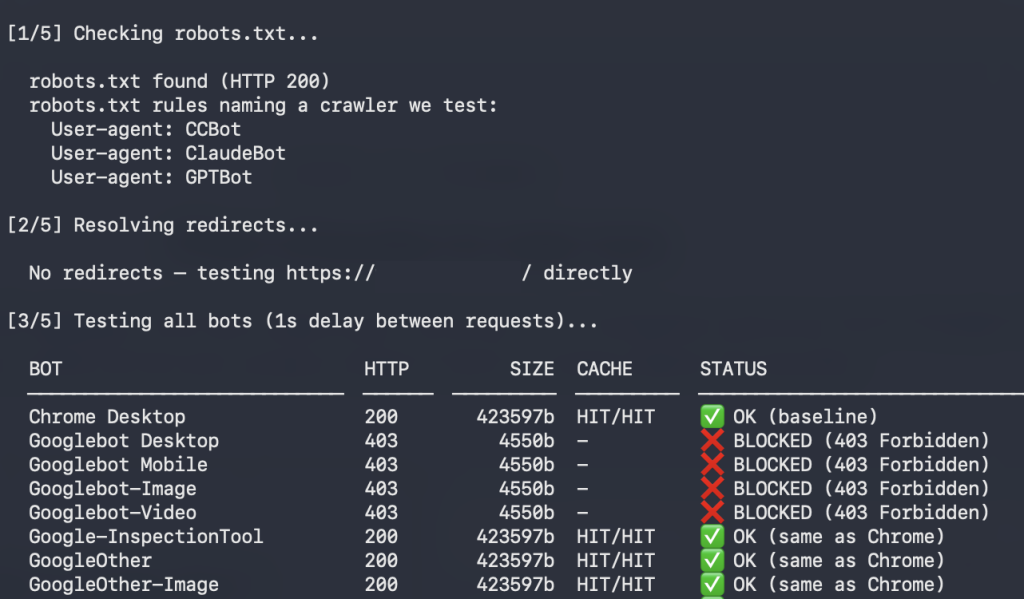
Start with your robots.txt, but don’t stop there. Many blocks happen at the hosting, CDN, firewall or security plugin level, and nobody remembers adding them. On a few sites I’ve audited, ClaudeBot was blocked by the host, a rule added around two years ago when it crawled aggressively. Today a rule like that can also block the bots Claude uses to find and read pages for its answers.
To test all of these at once, use the AI Crawler Checker. It sends requests to your site as over 30 AI bots and shows which ones get through. he checker sends requests with each bot’s user agent, not from the providers’ own servers, so it shows how your site responds to that user agent. It can’t prove what the real bot gets, but it’s a great starting point for your tests.
Check your server logs, but verify what you see. Many visits that look like AI bots come from scraping and testing tools that use an AI bot’s user agent, my own crawler checker included. Check the IP address against the ranges OpenAI, Anthropic and Perplexity publish before you draw conclusions.
Look at what bots bring back, not just how often they visit. In one audit, the busiest bot was Diffbot, a data crawler, with more than twice as many requests as ChatGPT-User. Blocking a crawler like this has much less impact on your AI visibility than blocking a search crawler, and it can reduce server load. And more AI bot visits don’t mean more mentions in AI answers. To see your visibility, look at referral traffic from AI tools and whether your brand appears in their answers.
AI tools don’t always show your latest version. When I updated one of my pages, an AI tool kept showing the old version for hours, even though my site had no caching. AI answers often use a stored copy, so give changes time.