

In technical audits, I often find AI training bots blocked. Sometimes it’s a deliberate choice, but more often it’s a hosting rule, a security plugin or a CDN setting nobody remembers adding. And in 2026, the question of whether to block them got harder to answer.
AI companies are starting to support a shared robots.txt token for training, Microsoft is changing how its preferences work, and Cloudflare changed what its “block AI bots” settings actually block.
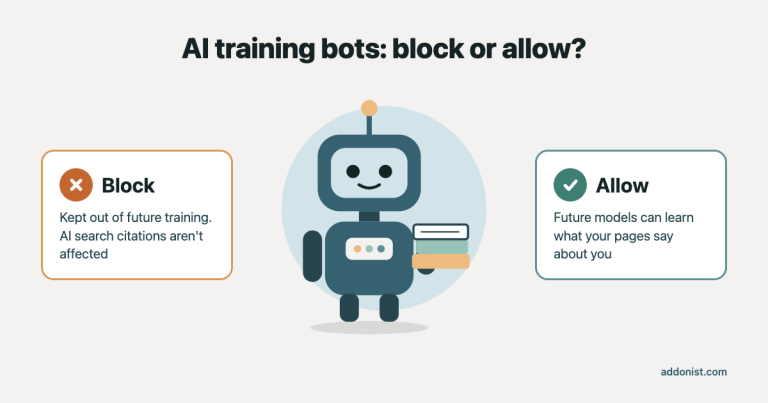
So should you block AI training bots? It depends on what you want from AI tools. Blocking stops AI companies’ training crawlers from collecting your new content, and allowing lets future models learn what your own pages say about you. This article explains what a training block stops, what it doesn’t, and what changes either way, so you can decide with the full picture.
Key takeaways
- A training block doesn’t stop most citations. AI search tools cite pages through their search bots, like OAI-SearchBot, not through training bots like GPTBot or ClaudeBot. The exception is Google-Extended, which also controls Gemini app answers.
- It only works from now on. Content models already learned stays in them, and older Common Crawl archives stay available.
- Most blocks aren’t in robots.txt. They come from the CDN, the host or a security plugin. On Cloudflare, choosing “Block” for training also stops Googlebot, Bingbot and Applebot, while “Disallow AI Training” doesn’t.
If you’re not sure which bots do what, start with my article on the types of AI bots.
What happens when you block AI training bots?
When you block an AI training bot, the company behind it stops using your new content to train its future models, as long as it respects your robots.txt. Everything else about how AI tools see your site mostly stays the same.
Training bots collect content that becomes part of what a model “knows” in general. Most AI companies use separate bots for training and for search, like OpenAI’s GPTBot and OAI-SearchBot. Google and Apple use one crawler for both, with a robots.txt token (Google-Extended, Applebot-Extended) for training. Either way, you can opt out of training without blocking search.
What a training block stops
- Future training. Content you publish after the block isn’t used to train that company’s next models.
- Gemini app answers, for Google. Google-Extended controls both training and grounding in Gemini Apps and Vertex AI. If you block it, your pages can’t appear as sources in Gemini app answers either. Google says sites that allow Google-Extended can appear in those responses and get clicks from them.
What a training block doesn’t stop
- What models already learned. Content collected before the block stays in existing models. A block only works from now on.
- Common Crawl’s archive. CCBot collects pages for Common Crawl, a public archive many AI companies train on. Blocking it today doesn’t remove older crawls from the archive.
- Citations in AI search. ChatGPT, Claude and Perplexity cite pages through their search crawlers and user-triggered fetchers, like OAI-SearchBot and ChatGPT-User, not their training bots.
- Google’s AI Overviews and AI Mode. They use content from Googlebot, not Google-Extended. To opt out of them, use the Search generative AI control in Search Console. It keeps your site out of AI Overviews, AI Mode and Discover’s AI features without affecting regular search results.
- Bots that ignore robots.txt. A robots.txt block is a request. Bots that don’t follow it need a firewall or CDN rule.
Blocking vs allowing AI training bots: what changes
When you block training in robots.txt, or with Cloudflare’s “Disallow AI Training”, the main difference is what future AI models learn about you. Most other things, like citations in AI search and Google’s AI features, work the same either way.
| If you block training bots | If you allow them | |
|---|---|---|
| Future AI models | Don’t learn from your new content | Can learn from your content |
| What models already know | Stays the same | Stays the same, and can be updated in new models |
| Who describes your brand in answers without search | Likely more from other sites: reviews, forums, articles | Your own pages too, plus other sites |
| Citations in ChatGPT, Claude and Perplexity search | Not affected | Not affected |
| Gemini app answers (Google-Extended) | Your pages can’t be used | Your pages can be used |
| Google AI Overviews and AI Mode | Not affected | Not affected |
| Server load from training crawlers | Lower from training bots like GPTBot (Googlebot still crawls) | Training bots keep crawling |
| Control over how your content is used | More control, and a position for licensing talks | Less control |
The row that matters most depends on your site. For a publisher, control over its content can be the whole point. For a business that wants AI tools to describe it accurately, the third row is the one to think about.
Why do websites block AI training bots? 4 common reasons
Most sites that block training bots do it for one of four reasons: they get almost no traffic back, they want control over their content, they want leverage for a licensing deal, or the crawlers cost them too much in server load.
1. Little traffic comes back from AI crawlers
Training bots take content and send nothing back, because a model’s general knowledge doesn’t link to its sources. Cloudflare’s data shows how uneven this is. Counting all of each company’s crawlers, in July 2025 Anthropic crawled about 38,000 pages for every visitor it referred, OpenAI about 1,100, Perplexity about 195 and Google about 5. Cloudflare says these are upper bounds, because some referrals from apps aren’t counted, but the gap is still huge.
The publishers on TollBit’s network saw the same pattern. In late 2025, AI apps sent them 0.12% of their referral traffic, compared with 80.5% from Google.
2. Copyright and control over content
Many publishers don’t want their work used to train models that may later answer their readers’ questions instead of them. In Europe, robots.txt now carries more weight here: the EU’s Code of Practice for general-purpose AI models commits the AI companies that sign it to use crawlers that follow robots.txt and other machine-readable opt-outs. Signing the Code is voluntary, but the obligation behind it isn’t: under the EU AI Act, providers of general-purpose AI models must respect machine-readable opt-outs from text and data mining. Whether robots.txt counts as one in every case is still being tested in court.
3. Leverage for licensing deals
Training data has become something AI companies pay for. When OpenAI and News Corp signed a multi-year deal in May 2024, the Wall Street Journal estimated it at $250 million over five years, covering access to current and archived content and its use for training. A block keeps that kind of deal possible.
4. Server load from AI crawlers
AI crawlers can be heavy. In April 2025, Wikimedia said bandwidth for multimedia downloads had grown 50% since January 2024, mostly because of scrapers. Bots made up 65% of its most expensive traffic, but only 35% of pageviews. For smaller sites, a busy crawler can mean slower pages or a bigger hosting bill. This only works for real training crawlers like GPTBot or CCBot. Blocking Google-Extended or Applebot-Extended doesn’t reduce crawling, because Googlebot and Applebot still fetch your pages.
And sometimes nobody decided at all. On a few sites I’ve audited, a hosting rule blocked ClaudeBot for years, and nobody remembered adding it.
Why do websites allow AI training bots? 3 common reasons
Sites that keep training bots open usually want AI models to know them and describe them correctly, especially in answers where the AI doesn’t search the web.
1. Most ChatGPT answers don’t show a web search
AI tools don’t search for every question. Ahrefs analysed 66.6 million ChatGPT responses from free, logged-out sessions in August and September 2026, and only 14.4% contained fan-out queries, the searches ChatGPT runs to find sources. That doesn’t prove the rest came only from training, but it suggests many answers rely mostly on what the model already knows. For those answers, what the model learned about your brand matters more than citations.
Paid plans and reasoning models search more often, so the real share varies. But the point holds: many AI answers don’t seem to look at your site at all.
2. Being described accurately by AI tools
If a model never learns from your own pages, it describes you based on what other sites say: reviews, forums, comparison articles and older coverage. That information can be outdated or wrong, and you can’t correct it through your site.
That’s why many businesses want their product pages, pricing, policies and documentation in training data. These are facts they want AI tools to repeat correctly.
3. A block doesn’t remove content already collected
Some sites also keep training bots open because blocking them protects less than it seems. Content that’s already been collected stays in existing models, and older Common Crawl archives stay available to anyone training on them. A block only affects future crawls by companies that respect it.
Unblocking is slow too. If you change your mind later, your content only reaches models trained after that, not the ones people already use.
Does blocking AI training bots hurt your AI visibility?
It doesn’t seem to affect whether AI tools cite you, except in the Gemini app if you block Google-Extended. It may affect what AI models know about you, but nobody has measured that yet.
Citations in AI answers
BuzzStream checked about 4 million AI citations from ChatGPT, Gemini, AI Overviews and AI Mode against the robots.txt files of top news sites. Most sites that blocked AI bots were still cited:
- 88% of sites blocking GPTBot were still cited
- 92% of sites blocking Google-Extended were still cited
- 82% of sites blocking OAI-SearchBot, and 71% blocking ChatGPT-User, were still cited
BuzzStream counted citations from ChatGPT, Gemini, AI Overviews and AI Mode together, so a site blocking Google-Extended could still be cited in AI Overviews or ChatGPT while being left out of the Gemini app.
For training bots, this is expected, because citations come from search, not training. The more surprising part is that many sites blocking search bots were cited too. BuzzStream offers a few possible reasons, like pages indexed before the block or bots that ignore robots.txt, but doesn’t claim any of them for sure. The study looks at sites at one point in time, so it shows that a block doesn’t prevent citations, not whether it changes how often you’re cited.
What AI models know about your brand
This is the open question. If models don’t train on your pages, they probably know less about your brand, or learn it only from other sites. With most ChatGPT answers in Ahrefs’ data showing no search, that could matter. But I haven’t found a study that measures it, so treat it as a likely effect, not a proven one.
How many websites block AI training bots?
It depends a lot on the type of site. Most big news publishers block them, about a quarter of the top websites with a robots.txt do, and very few B2B SaaS sites do.
News publishers
News sites block AI training bots the most. A BuzzStream analysis of the biggest UK and US news sites in January 2026 found that:
- 79% block at least one AI training bot
- 71% block at least one AI search or live-fetch bot
- 34% of the top 50 block every AI bot in the study, including the BBC, The New York Times and the Wall Street Journal
- Anthropic’s training bot and CCBot were the least allowed
This shows up in AI training data too. A study of the sources behind major training datasets found that by April 2024, nearly 45% of news content in them was fully restricted by robots.txt, up from 3% a year earlier.
The top 1,000 websites
Crawl Readiness checked a sample of the 1,000 most visited websites. Of the 569 that had a robots.txt, about a quarter block at least one training bot in robots.txt (October 2026):
| Training bot or token | Blocked by (of 569 sites) |
|---|---|
| Bytespider (ByteDance) | 21.1% |
| CCBot (Common Crawl) | 20.9% |
| GPTBot (OpenAI) | 18.5% |
| ClaudeBot (Anthropic) | 18.3% |
| Google-Extended | 16.0% |
| Applebot-Extended | 15.1% |
The most interesting number is a different one: only 2.6% of them (15 sites) block training bots while leaving AI search bots open. Most sites that block, block everything. So “no training, but yes to citations” is rarely a deliberate choice, even though it’s possible.
B2B SaaS websites
SaaS sites are almost the opposite. In a scan of 390 B2B SaaS sites in September 2026, only 1.4% to 3.3% blocked any training bot in robots.txt, and almost none blocked AI search bots. But nearly half were behind Cloudflare, which matters more now (see the next section).
These numbers only count robots.txt. Blocks at the host, CDN or firewall level don’t show up in them, so the real share of blocked sites is likely higher. And not every block is a decision. In the sites I’ve audited, most blocks at the host or CDN level weren’t intentional: they came from default settings, security plugins or old rules nobody remembered.
Can blocking AI training on Cloudflare block Googlebot?
Yes, if you choose “Block”. Cloudflare’s Training category has two options that restrict training crawlers, and only one of them keeps your site in search:
- Disallow AI Training blocks training crawlers like GPTBot and ClaudeBot, and adds a no-training rule for Google-Extended and Applebot-Extended to your robots.txt. Googlebot, Bingbot and Applebot keep crawling for search. Bing doesn’t get the no-training preference yet: Cloudflare says that comes when Microsoft’s robots.txt support launches, planned for early 2027.
- Block stops Googlebot, Bingbot and Applebot from reaching your site at all, because they crawl for both search and training. In Cloudflare’s words, it “will stop Applebot, Bingbot, and Googlebot from reaching your site — search included.”
Both options came into effect on 15 September 2026, as Cloudflare announced. New domains that show ads now get Disallow AI Training as their preset, with Search allowed and Agent bots blocked on pages with ads. Sites without ads get Allow for both Training and Agent.
If you read about this earlier, you may have seen a different version. In July, Cloudflare said blocking Training would also block Googlebot, Bingbot and Applebot. The September options work differently, but many articles still repeat the July version.
If your site is on Cloudflare, check which option your Training category uses, and test whether Googlebot gets a 200 response from your site.
Disallow AI Training vs Block on Cloudflare
Both options stop training crawlers. Only Block also stops Googlebot, Bingbot and Applebot from crawling for search.
Cloudflare setting
Training category
Training bots
Search + training
Cloudflare setting
Training category
Training bots
Search + training
Since 15 September 2026. With Disallow AI Training, Bing doesn’t receive the no-training preference until Microsoft’s robots.txt support launches (planned for early 2027). Source: Cloudflare.
How to block AI training bots in robots.txt
To block training, add a robots.txt group for each company’s training bot or token. You can block your whole site, or only some folders.
Training bots and tokens by company
| Company | robots.txt name | What it controls |
|---|---|---|
| OpenAI | GPTBot | Training. Search (OAI-SearchBot) and user fetches (ChatGPT-User) are separate |
| Anthropic | ClaudeBot | Training. Claude-SearchBot and Claude-User are separate |
Google-Extended | Training for Gemini, and grounding in Gemini Apps and Vertex AI. It’s a token, not a crawler: Googlebot does the fetching | |
| Apple | Applebot-Extended | Training for Apple’s models. A token: Applebot does the fetching |
| Microsoft | __usage_ai-training (from 1 February 2027) | Bingbot crawls for both Bing search and AI, and there’s no separate training name yet. Don’t block Bingbot, or your site drops out of Bing search |
| Common Crawl | CCBot | A public archive that many AI companies train on |
| Meta | meta-externalagent | Meta says it crawls “for use cases such as training AI models” |
| ByteDance | Bytespider | Often reported to ignore robots.txt, so a firewall rule may be needed |
For example, this blocks training for the whole site, but keeps a press folder open:
User-agent: GPTBot
User-agent: ClaudeBot
User-agent: CCBot
User-agent: Google-Extended
User-agent: Applebot-Extended
User-agent: meta-externalagent
User-agent: Bytespider
Disallow: /
Allow: /press/
The shared __usage_ai-training token, coming in 2027
AI companies are adding one shared robots.txt token for training, __usage_ai-training. It was proposed in an IETF draft from Anthropic in October 2026, and it isn’t live everywhere yet: Microsoft will read it from 1 February 2027, Google plans to support it in 2027, and OpenAI aims to in the coming months. It’s still an individual draft, not a final standard. It was submitted to the IETF’s AI Preferences working group, which is also standardizing how to express AI usage preferences in robots.txt and HTTP headers.
And like the other tokens, it says how your content may be used. It doesn’t stop crawlers from requesting your pages.
User-agent: __usage_ai-training
Disallow: /
The company-specific names above keep working alongside it, and they win where both are set. For Google, blocking the shared token without naming Google-Extended also blocks Gemini Apps grounding. Microsoft is also adding separate ai-training and ai-grounding preferences that you can set for each page with a meta tag or an X-Robots-Tag header, from 1 February 2027. I explain how the token works in my article on the types of AI bots.
How to check which AI training bots your site blocks
Check three places: your robots.txt, your CDN or host settings, and what each bot actually gets when it requests your pages, in a test and in your logs. A block can exist in any of them, and they don’t always agree.
- Read the robots.txt your site actually serves. Open yoursite.com/robots.txt in a browser, not the file in your editor. Some CDNs, like Cloudflare, can add AI rules to it for you.
- Check your CDN, host and security plugins. On Cloudflare, check which option the Training category uses: “Block” also stops Googlebot, “Disallow AI Training” doesn’t. On other hosts, ask whether they block any AI bots by default.
- Test each bot. My AI Crawler Checker requests your page as over 30 AI and search bots, including the training bots in this article, and shows what each one gets back. It sends each bot’s user agent, not requests from the companies’ own servers, so it shows how your site responds, not what the real bot sees.
- Check your server logs. Your access logs show which AI bots actually visit and what status code each one gets, such as 200, 403 or 429. Search them for the bot names, like GPTBot or ClaudeBot. A robots.txt block won’t show up as 403 errors, because bots that follow it simply stop requesting your pages. And you won’t find Google-Extended or Applebot-Extended in your logs at all, since Googlebot and Applebot do the crawling. To make sure a visit is the real bot and not a fake user agent, compare its IP address with the ranges the company publishes. If your CDN blocks a bot, the request may never reach your server, so check the CDN’s logs too. On Cloudflare, that’s Security Events.
- Check Googlebot separately. Use the URL Inspection tool in Google Search Console and click Test Live URL. Without it, you see Google’s last crawl, which may be from before a CDN change. If you use Cloudflare’s training settings, this is the quickest way to check that Googlebot can still crawl your site.
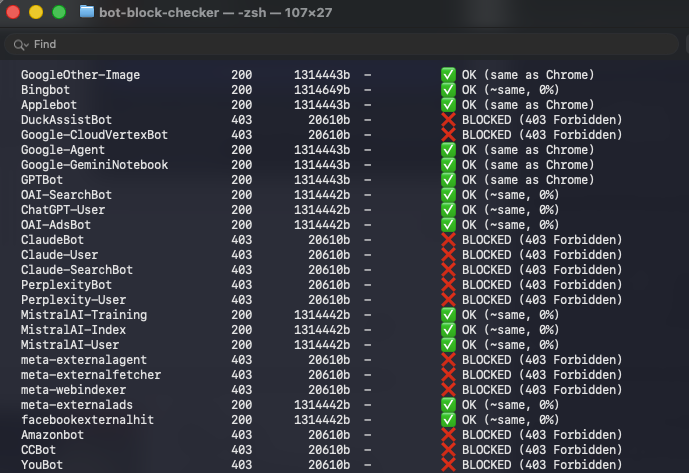
Once you know what’s blocked, you can decide on purpose, instead of keeping a block that someone added years ago.
How to decide whether to block AI training bots
Start with what you want from AI tools, and compare it with what a block actually changes:
- Do you want AI models to describe your brand from your own pages? A block makes that harder.
- Is your content the product? A block gives you more control, and a stronger position if a licensing deal comes up.
- Are AI crawlers slowing your site down? A block helps with the ones that respect robots.txt. The rest need a firewall rule.
- Do you only want to stay out of Google’s AI Overviews and AI Mode? Google-Extended won’t do that. Use the setting in Search Console instead.
Whatever you choose, make it a decision, and check that your host or CDN isn’t making it for you.