Configure the add-on
1. Launch the add-on
- Click on Extensions → Backlink Monitor → Open Backlink Monitor
- The sidebar will appear on the right side of your spreadsheet
2. Configure basic settings
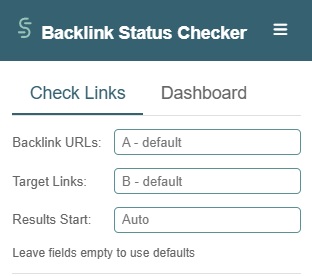
In the sidebar:
- Backlink URLs: Confirm the column containing the pages to check. You can specify a column containing your backlink URLs, or leave empty for the default: column A
- Target Links: Confirm the column containing the links to look at. You can specify a column containing your target URLs, or leave empty for the default: column B
- Results Start: Leave empty to have results start in the first empty column, or specify a column.
3. Select rows to check
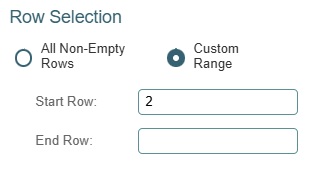
- Choose All Non-Empty Rows to check all non-empty rows in the specified or default columns
- Or select Custom Range if you want to check specific rows
4. Link match options
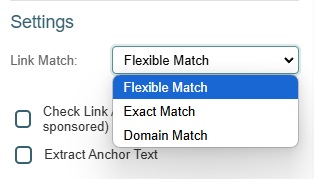
- Flexible Match: Finds links even if they have minor variations (recommended for most cases)
- Ignores protocol differences (http:// vs https://)
- Ignores www. prefix differences
- Ignores trailing slashes
- Exact Match: Only finds links that match exactly character-for-character
- Domain Match: Matches if the target domain appears in the link (less specific)
Flexible Match is the default and works best for most cases by ignoring small differences like HTTP vs HTTPS, www., and trailing slashes.
5. Additional check options
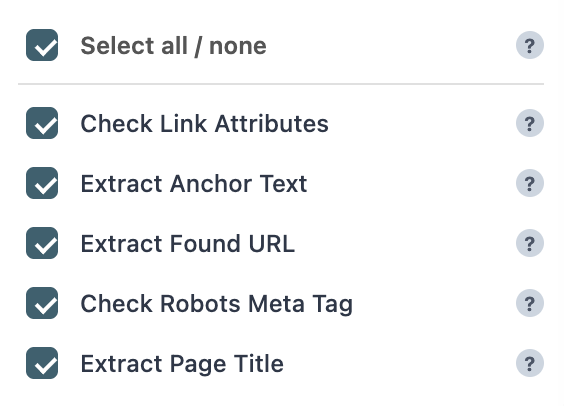
- Check Link Attributes: Detect if links have rel=”nofollow”, “ugc”, or “sponsored” attributes
- Extract Anchor Text: Capture the clickable text of found links
- Extract Found URL: Return the actual URL found (helpful with redirects)
- Check Robots Meta Tag: Detect if the page has robots meta directives (noindex/nofollow)
- Extract Page Title: Extract the page’s <title> tag
5. Start the check
- Click the Start Check button
- You’ll see a progress bar showing the status of your check
- Depending on the number of links, the check may take a few minutes to complete
You can stop you’re check before checking all URLs by clicking on the stop button.